How to choose an AI assistant for your company: ChatGPT, Copilot, Gemini or Claude
How to choose between ChatGPT, Microsoft Copilot, Gemini and Claude for your company: criteria, data requirements and a two-week trial with real tasks.
Training · ticket classifier
Loss per epoch
Epoch 1/8loss 0.92acc 61%
Epoch 4/8loss 0.41acc 84%
Epoch 8/8loss 0.18acc 93%
Validation accuracy
93%
Model saved · v3
Neural Soft 4 min read
Key points
Start from where the team already works; Microsoft 365 and Google Workspace have their own built-in assistant.
Always with a business plan, a data processing agreement and no training on your data.
Compare using your own tasks for two weeks, not demos or leaderboards.
Differences between models change every few months; training and a usage policy work for all of them.
“Which do we use, ChatGPT or Copilot?”, “What about Claude?”, “Doesn’t Gemini already come with Google?”. It is one of the questions we hear most. And while the decision is pending, the team usually uses personal accounts, with company data and no control at all.
The good news is that the big tools are all very capable. The choice depends less on which one is “the best” and more on where your team works, what data it will handle and which tasks it wants to solve.
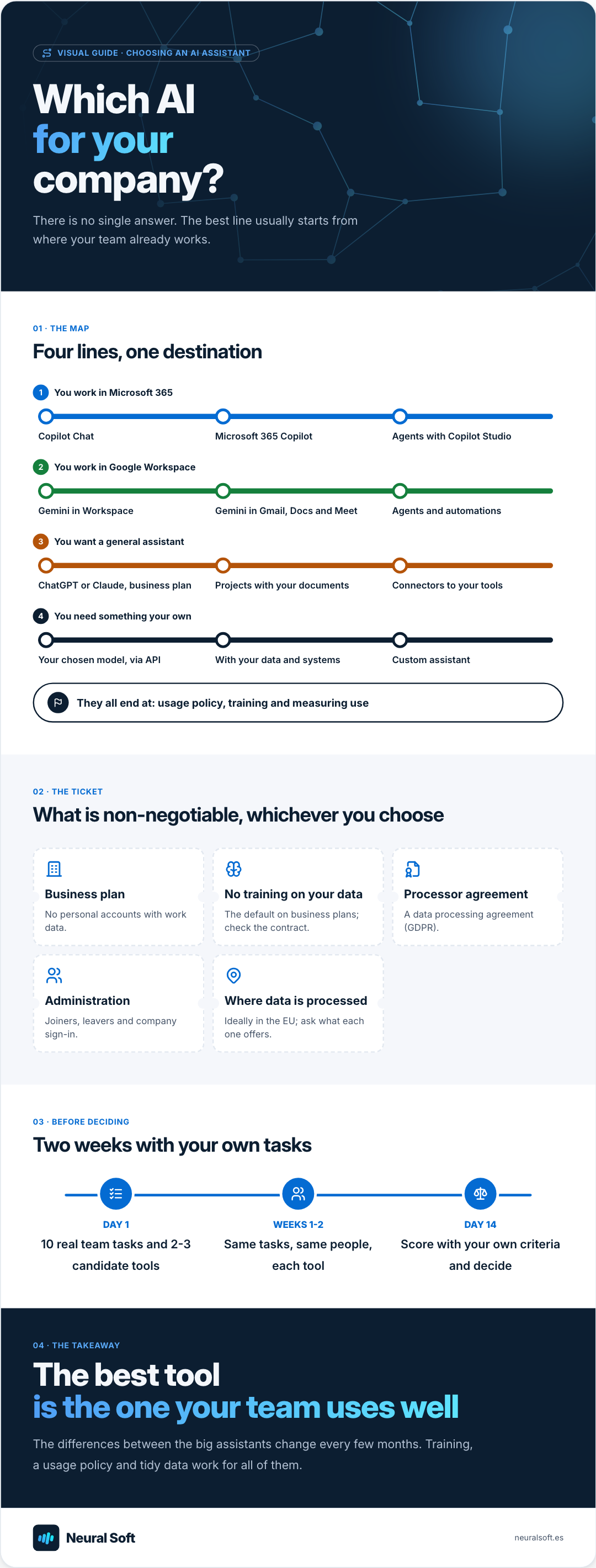
Visual guide · Choosing an AI assistant
Which AI for your company?
There is no single answer. The best line usually starts from where your team already works.
01 · The map
Four lines, one destination
1You work in Microsoft 365
Copilot ChatMicrosoft 365 CopilotAgents with Copilot Studio
2You work in Google Workspace
Gemini in WorkspaceGemini in Gmail, Docs and MeetAgents and automations
3You want a general assistant
ChatGPT or Claude, business planProjects with your documentsConnectors to your tools
4You need something your own
Your chosen model, via APIWith your data and systemsCustom assistant
They all end at: usage policy, training and measuring use
02 · The ticket
What is non-negotiable, whichever you choose
Business plan
No personal accounts with work data.
No training on your data
The default on business plans; check the contract.
Processor agreement
A data processing agreement (GDPR).
Administration
Joiners, leavers and company sign-in.
Where data is processed
Ideally in the EU; ask what each one offers.
03 · Before deciding
Two weeks with your own tasks
Day 110 real team tasks and 2-3 candidate tools
Weeks 1-2Same tasks, same people, each tool
Day 14Score with your own criteria and decide
04 · The takeaway
The best tool is the one your team uses well
The differences between the big assistants change every few months. Training, a usage policy and tidy data work for all of them.
Microsoft 365 (Outlook, Teams, SharePoint): the natural route is Copilot. Copilot Chat comes with work accounts, and the Microsoft 365 Copilot licence adds emails, meetings and documents. We explain it in detail in Microsoft 365 Copilot in your company.
Google Workspace (Gmail, Drive, Meet): Gemini is built into the Workspace business plans.
A general assistant, separate from your office suite: ChatGPT or Claude on their business plans, with projects for working with your documents and connectors to other tools.
Something very specific (with your data, in your applications): a custom assistant with the best-fitting model, via API.
What is non-negotiable
Whichever you choose, check these points before giving the team access:
Business plan
Accounts managed by the company, not personal ones. With joiners, leavers and company sign-in.
No training on your data
The big vendors’ business plans do not use your conversations for training by default. Confirm it in the terms.
Contract and location
A data processing agreement (GDPR) and, where possible, processing or storage in the EU.
The criteria for comparing
With the basics covered, the comparison has to be done with your tasks. These are the criteria that usually matter most:
Quality on your tasks
Writing in your tone, summarising your documents, analysing your data. Not in a generic demo.
Integration
Whether it works inside the tools you already use or forces copy and paste.
Data and security
What information it can reach, with what permissions and what controls the administrator has.
Total cost
Per-user licences, who really needs them and the time for training and roll-out.
To structure the decision, a weighted scorecard stops the tool that impressed most in the first test from winning by default:
Criterion
Weight
ATool A
BTool B
CTool C
Quality on our tasks
×3
4 / 5
5 / 5
4 / 5
Integration with what we use
×3
5 / 5
3 / 5
2 / 5
Data and security
×2
4 / 5
4 / 5
3 / 5
Ease of use for the team
×2
4 / 5
4 / 5
3 / 5
Total cost
×1
3 / 5
4 / 5
5 / 5
Weighted total
4.2
4.0
3.2
An example with fictitious data: each company sets the criteria, weights and scores after the trial.
How to run the trial in two weeks
1
Choose 10 real tasks
The ones the team does every week: a difficult email, a report, summarising a contract, analysing a spreadsheet.
List of test tasks
2
Choose 2 or 3 candidates
Usually the one built into your office suite and one or two general assistants, all on a business plan or a business trial.
3
Same tasks, same people
Each person tries the same tasks in each tool and notes the result and the time taken.
4
Score with your criteria
Using the weights agreed before starting, not afterwards.
Scorecard
5
Decide and train
One approved tool (or two, by role), a usage policy and short training for the whole team.
One tool for everyone or several?
One for everyone
Simpler to manage and to train.
One policy and one contract.
Enough for most SMEs.
Several by role
The built-in one for everyone and another for specific roles.
Useful when tasks differ a lot (development, analysis, writing).
Needs more discipline: all approved and in the usage policy.
Yes, and it is common: for example, the assistant built into Microsoft 365 for everyone and another general assistant for people who write or analyse a lot. What matters is that they are all approved, on a business plan and covered by the usage policy.
Are free versions fine for work?
Not for company data. Personal versions may use conversations to improve models and give the company no control over accounts. For public information the risk is lower, but the whole team should use the approved tools.
Which is the best model?
It depends on the task and changes often: every few months a new version overtakes the others at something. That is why we recommend deciding with your real tasks and reviewing the choice every year.
We help small and medium-sized businesses find where AI can add value, which cases are worth testing and how to start without investing in solutions they do not need.
We build chatbots and internal assistants connected to your company's information to answer questions, reduce repetitive queries and help the team find what it needs faster.
How to implement artificial intelligence in an SME: choosing the first use case, running a pilot, buying or building, measuring the return, avoiding mistakes.
We use Google Analytics to see which pages are visited. Its cookies are only set if you accept; if you decline, Google only receives cookieless signals. You can change this at any time from the footer. Cookie policy