Microsoft 365 Copilot in your company: how to prepare to get the most out of it
Copilot Chat or a Microsoft 365 Copilot licence, permissions and oversharing, where to start and how to roll it out in an SME step by step.
Weekly report · AI-generated
Orders
1,284
+8%
Issues
23
−12%
Avg. lead time
2.1 days
+0.3
Orders per day
M
T
W
T
F
Summary
Orders are up thanks to the autumn campaign. Issues are down, but delivery times are growing in the north: transport should be reviewed.
Sent to management · Monday, 8:00
Neural Soft 5 min read
Key points
Copilot Chat comes with the work account; a Microsoft 365 Copilot licence adds the apps and the company's data.
Copilot sees everything each person has permission to open. Before rolling it out, check what is overshared.
Not everyone needs a licence; start with the roles that will make the most of it.
Roll-out works best in phases, with role-based training and usage measurement.
Many companies that work with Microsoft 365 are asking the same questions: should we switch on Copilot? For whom? What are the risks? The demo is convincing (meeting summaries, drafts in seconds, analysis in Excel), but real results depend above all on what lies underneath: how documents are organised, who has access to what and whether the team knows how to ask for things well.
This guide explains what each version includes, the risk that is most often overlooked and how to roll it out step by step in an SME.
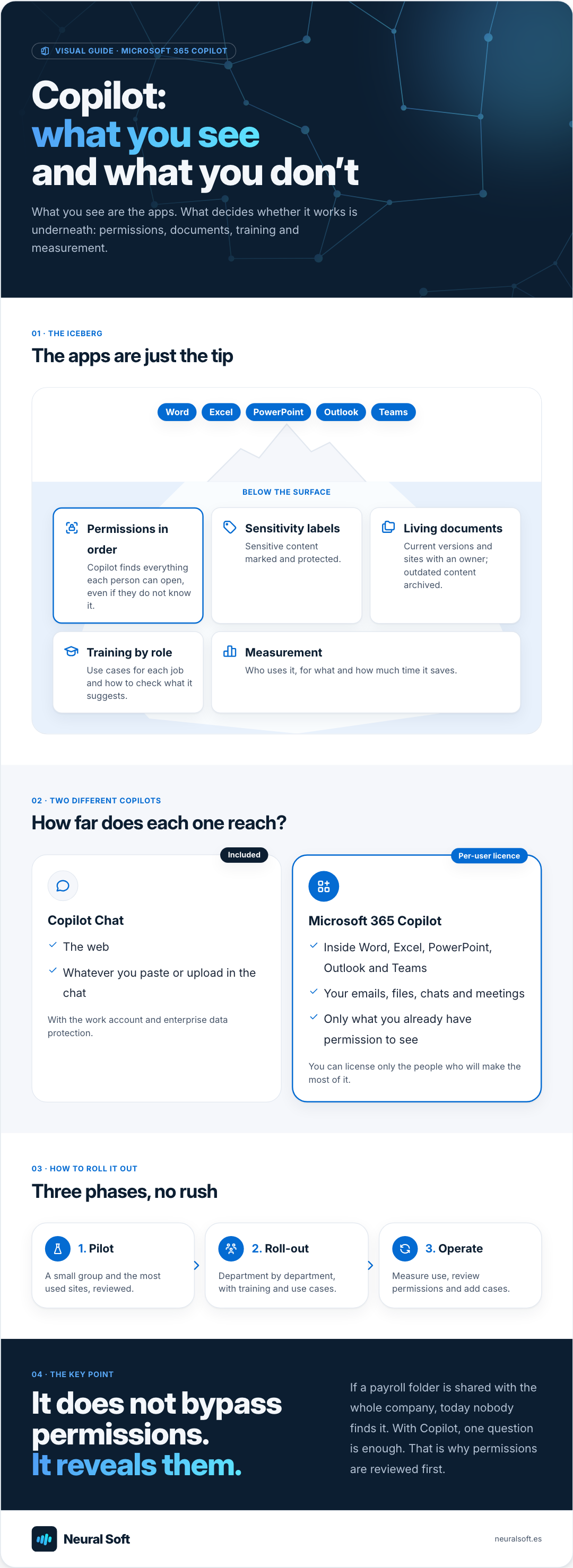
Visual guide · Microsoft 365 Copilot
Copilot: what you see and what you don’t
What you see are the apps. What decides whether it works is underneath: permissions, documents, training and measurement.
01 · The iceberg
The apps are just the tip
Word
Excel
PowerPoint
Outlook
Teams
Below the surface
Permissions in orderCopilot finds everything each person can open, even if they do not know it.
Sensitivity labelsSensitive content marked and protected.
Living documentsCurrent versions and sites with an owner; outdated content archived.
Training by roleUse cases for each job and how to check what it suggests.
MeasurementWho uses it, for what and how much time it saves.
02 · Two different Copilots
How far does each one reach?
Included
Copilot Chat
The web
Whatever you paste or upload in the chat
With the work account and enterprise data protection.
Per-user licence
Microsoft 365 Copilot
Inside Word, Excel, PowerPoint, Outlook and Teams
Your emails, files, chats and meetings
Only what you already have permission to see
You can license only the people who will make the most of it.
03 · How to roll it out
Three phases, no rush
1. Pilot
A small group and the most used sites, reviewed.
2. Roll-out
Department by department, with training and use cases.
3. Operate
Measure use, review permissions and add cases.
04 · The key point
It does not bypass permissions. It reveals them.
If a payroll folder is shared with the whole company, today nobody finds it. With Copilot, one question is enough. That is why permissions are reviewed first.
Copilot Chat and Microsoft 365 Copilot are not the same thing
Microsoft uses the name “Copilot” for several things. At work, the two that matter are:
Copilot Chat: the AI chat included with Microsoft 365 work accounts, with enterprise data protection. It answers using the web and whatever you paste or upload in the conversation. It is a good way in, and it replaces the use of personal tools.
Microsoft 365 Copilot: an additional per-user licence. It adds Copilot inside Word, Excel, PowerPoint, Outlook and Teams, and lets it work with each person’s emails, files, chats and meetings, always within what that person already has permission to see.
How Copilot answers with company data
When someone with a licence asks something, Copilot searches the Microsoft 365 information that person can access, passes it to the language model with the question and returns an answer with references to the documents used.
01
Question
In Teams, Outlook, Word or the Copilot chat.
What was agreed with Example Ltd?
02
Searches with your permissions
Emails, files, chats and meetings that person can open.
3 emails · 1 set of minutes
03
Drafts
The model answers with what it found.
Summary with references
04
Human review
Check
The person checks the sources before using it.
Open the cited minutes
A question to Microsoft 365 Copilot, simplified.
The most overlooked risk: oversharing
Copilot does not bypass permissions. The problem is that in many companies permissions are far more open than anyone thinks, and until now nothing happened because nobody found those files. With Copilot, one question is enough.
Organisation-wide links
Documents shared with "anyone in the company" years ago, for convenience.
Sites and teams with no owner
SharePoint sites or Teams teams from finished projects, open to everyone.
Inherited sensitive folders
Payroll, contracts or customer data in locations with broad permissions.
Old versions
Three versions of the same procedure: Copilot may cite the one that no longer applies.
Microsoft publishes guidance to prevent this before deploying Copilot. It includes SharePoint reports to detect overshared content, the option to exclude specific sites from Copilot while they are reviewed (Restricted Content Discovery) and Microsoft Purview sensitivity labels to protect sensitive content.
Where to start: the uses with the best return
Not every use of Copilot pays off equally. In most SMEs, the biggest early savings come from tasks that already take hours each week: meetings, email and documents.
Impact
Start here
Plan it as a project
Quick wins, if cheap
Drop it for now
Summarising Teams meetingsCatching up on email threadsDrafts from documentsData analysis in ExcelPresentations from a documentAgents with Copilot Studio
Effort
Summarising Teams meetings
Catching up on email threads
Drafts from documents
Data analysis in Excel
Presentations from a document
Agents with Copilot Studio
An illustrative example: the real impact depends on how each team works.
Agents (assistants with a specific task, built with Copilot Studio) can add a lot of value, but they are a project in themselves: better once the team has mastered the basics.
How to roll it out in an SME
1
Inventory and permissions
What is used today (personal tools included), which sites hold sensitive information and who has access.
Permissions risk map
2
Minimum clean-up
Close organisation-wide links, give sites an owner and archive what is obsolete. Label sensitive content.
3
Pilot with a group
Between five and fifteen people in different roles, with specific use cases for their job.
Validated use cases
4
Role-based training
How to ask for things, how to check what it suggests and what it is never asked to do.
5
Measure and expand
Real usage, time saved per task and satisfaction. Licences are expanded where the savings show.
Adoption report
For the AI Act, Copilot is one more AI tool: the company must train the people who use it (AI literacy), and it should be covered by your AI usage policy, stating what can and cannot be done with it.
According to Microsoft, company data, prompts and responses in Microsoft 365 Copilot are not used to train the foundation models. Check this against your contract terms and Microsoft's data protection documentation.
Do we need to buy the licence for all staff?
No. A common approach is Copilot Chat for everyone and the Microsoft 365 Copilot licence only for people who work all day with email, meetings and documents, expanding once the pilot proves the time saved.
Is it GDPR compliant?
Microsoft acts as a data processor and offers commitments to process European customers' data in the EU. Even so, the company remains responsible: it must review which personal data Copilot can reach, update its record of processing and train its staff.
We help small and medium-sized businesses find where AI can add value, which cases are worth testing and how to start without investing in solutions they do not need.
We build chatbots and internal assistants connected to your company's information to answer questions, reduce repetitive queries and help the team find what it needs faster.
How to choose between ChatGPT, Microsoft Copilot, Gemini and Claude for your company: criteria, data requirements and a two-week trial with real tasks.
How to implement artificial intelligence in an SME: choosing the first use case, running a pilot, buying or building, measuring the return, avoiding mistakes.
We use Google Analytics to see which pages are visited. Its cookies are only set if you accept; if you decline, Google only receives cookieless signals. You can change this at any time from the footer. Cookie policy