AI agents in your company: what they are, what they can do and how to keep them in check
What an AI agent is, how it differs from a chatbot or an automation, examples in an SME, the risks and how to start with human approval.
Ticket agent · run
Goal: resolve ticket #4521 (incomplete order)
find_order("4521")
3 items · 1 missing
check_stock("B-77")
Available · 14 units
prepare_shipment("B-77")
Shipment ready for tomorrow
Approval required
Ship the missing item at no cost
ApproveReview
Neural Soft 5 min read
Key points
An AI agent receives a goal, decides the steps and uses tools (ERP, email, spreadsheets) to achieve it.
It fits multi-step tasks with some variety, where a fixed automation falls short.
Autonomy comes in degrees: the sensible start is agents that prepare and a person who approves.
Least privilege, a log of every step and limits matter as much as the model.
“Agents” is the buzzword in AI. Behind it is a simple idea: instead of asking the AI something and copying the answer, you give it a goal and it decides the steps itself, consults the systems it needs and prepares (or carries out) the result.
Done well, agents save a lot of work on multi-step tasks. Done badly, they are a fast way to make mistakes at scale. The difference lies in how much autonomy they get and with what brakes.
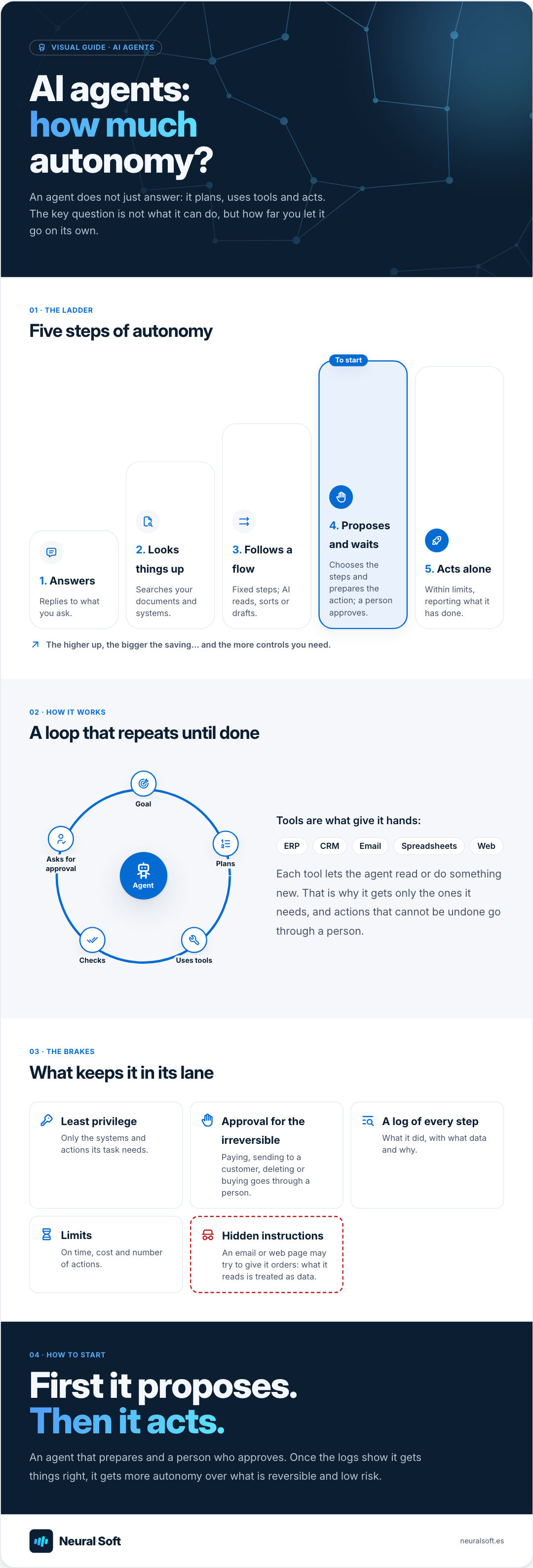
Visual guide · AI agents
AI agents: how much autonomy?
An agent does not just answer: it plans, uses tools and acts. The key question is not what it can do, but how far you let it go on its own.
01 · The ladder
Five steps of autonomy
1. AnswersReplies to what you ask.
2. Looks things upSearches your documents and systems.
3. Follows a flowFixed steps; AI reads, sorts or drafts.
To start4. Proposes and waitsChooses the steps and prepares the action; a person approves.
5. Acts aloneWithin limits, reporting what it has done.
The higher up, the bigger the saving… and the more controls you need.
02 · How it works
A loop that repeats until done
AgentGoalPlansUses toolsChecksAsks for approval
Tools are what give it hands:
ERP
CRM
Email
Spreadsheets
Web
Each tool lets the agent read or do something new. That is why it gets only the ones it needs, and actions that cannot be undone go through a person.
03 · The brakes
What keeps it in its lane
Least privilegeOnly the systems and actions its task needs.
Approval for the irreversiblePaying, sending to a customer, deleting or buying goes through a person.
A log of every stepWhat it did, with what data and why.
LimitsOn time, cost and number of actions.
Hidden instructionsAn email or web page may try to give it orders: what it reads is treated as data.
04 · How to start
First it proposes. Then it acts.
An agent that prepares and a person who approves. Once the logs show it gets things right, it gets more autonomy over what is reversible and low risk.
A chatbot answers. An automation always follows the same steps (when an invoice arrives, extract the data and record it). An agent receives a goal and decides for itself what to do, in what order and with which tools.
Automation
Fixed steps, defined in advance.
Very reliable when the process is always the same.
Breaks on a case nobody anticipated.
Agent
Decides the steps based on what it finds.
Adapts to varied cases.
Needs limits, logging and human approval.
Examples in an SME
Three typical tasks, with data from a fictitious company. In all three, the agent prepares and a person approves.
Preparing a quote
Request by email
“We need 40 office chairs and 10 adjustable desks for a new site, delivered before the end of the month.”
What the agent prepares
Products
2 catalogue items
Stock
Chairs: yes · Desks: 6 of 10
Lead time
Remaining desks in 12 days
Draft quote for review
Resolving an order issue
Customer message
“Order 4512 arrived incomplete: two boxes are missing.”
What the agent prepares
Reply to the customer and resending of the two boxes proposed.
Order
6 parcels sent, 4 delivered
Carrier
Claim opened
Awaiting approval
Month-end close
Goal
“Check which October delivery notes have no invoice and prepare the list to chase.”
This is how a well-designed agent works in the first example. Note that it consults systems on its own, but anything going to the customer passes through a person.
Customer
Agent
ERP
Sales rep
Customer → Agent: Asks for a quote by email
Agent → Agent: Understands the request and plans
Agent → ERP: Looks up products, prices and stock
ERP → Agent: Returns data and lead times
Agent → Sales rep: Leaves the draft for review
Sales rep → Sales rep: Adjusts and approves
Sales rep → Customer: Sends the quote
A simplified example: the agent uses the ERP to check products, prices and stock, and leaves the quote ready.
The risks and how to control them
Hidden instructions
An email or web page may contain text that tries to give the agent orders ("ignore the above and…"). What the agent reads is treated as data, never as instructions, and its permissions limit the possible damage.
Chained errors
A mistake in the first step carries into the next ones. That is why results are checked and every step is logged.
Too many permissions
If the agent can do anything, a failure can do anything. Only the tools and actions its task needs.
Cost and loops
An agent can go round in circles. Limits on time, cost and number of actions.
How to start
1
Choose a multi-step task
Repetitive, with some variety and low risk if it goes wrong: preparing quotes, reconciling delivery notes, sorting and answering issues.
Task and success criteria
2
Define tools and limits
Which systems it can consult, what it can prepare and what needs approval.
3
Test with real cases
A set of past cases to check it gets them right before using it on new ones.
Test report
4
Pilot with approval
The agent prepares and a person approves everything. Accuracy and time saved are measured.
5
Expand carefully
More autonomy only for what is reversible and low risk, once the logs show it gets things right.
An automation follows fixed steps defined in advance. An agent receives a goal and decides which steps to take and which tools to use based on what it finds. That makes it better with varied cases, but it also needs more controls.
Do you need to code to have an agent?
Not for simple agents: tools such as Copilot Studio or the agent features of business assistants let you build them with little code. For agents connected to several systems or with complex business rules, development is usually needed.
What does the AI Act say about agents?
The AI Act has no specific category for agents: the same rules apply according to the use. If the agent talks to customers, it must be clear it is an AI; if it decides about people in areas such as employment or credit, it may be high risk. And the people who use it always need training.
We automate repetitive tasks with AI so your team spends less time copying data, reviewing documents, classifying requests or drafting replies by hand.
We design and build artificial intelligence solutions tailored to your processes, data and tools when an off-the-shelf solution does not fit or falls short.
How to extract data from invoices, delivery notes and PDFs with AI: how it differs from OCR, validations, human review, ERP integration and running a pilot.
We use Google Analytics to see which pages are visited. Its cookies are only set if you accept; if you decline, Google only receives cookieless signals. You can change this at any time from the footer. Cookie policy