Skip to content
Neural Soft

Use case

AI HR assistant for employees

An assistant that answers staff questions about holidays, leave, payslips and onboarding using the company's policies. Anything that needs a person goes to HR.

  • Answers that cite the source policy or collective agreement.
  • Each employee can only access their own data.
  • It makes no decisions about people, which keeps it outside the AI Act's high-risk category.
Monthly planner lying open on a wooden desk.

What it solves

The questions HR hears most often

Much of HR's time goes on answering questions that are already written down in some document.

  • Holidays and leave

    Days left, how to request them, paid leave and deadlines.

  • Payslips

    What each item means, when pay arrives and whom to ask if something looks wrong.

  • Onboarding

    First days, access, mandatory training and who to go to for what.

  • Internal policies

    Remote working, expenses, right to disconnect, equality or use of AI.

Examples

Three everyday conversations

Sample data from a fictitious company.

A question answered

Question from an employee

“How many days of holiday do I have left, and how far in advance do I need to request them?”

Answer

You have 9 working days left this year. They must be requested 15 days in advance through the employee portal.

Employee portal · Holiday policy, section 3

A new starter

Question from a new employee

“I start on Monday. What do I need to do in my first week?”

Answer

Day 1
Welcome and equipment
Days 2-3
Health and safety and data protection training
Week 1
Meeting with your manager

Onboarding plan 2026

What goes to a person

Question from an employee

“I think the night shift allowance is missing from my October payslip.”

Handover

The assistant does not review or correct payslips. It opens a query for Payroll with the month and the item, and tells the employee when to expect a reply.

Query assigned to Payroll

Responsible AI

What the assistant does and what it does not do

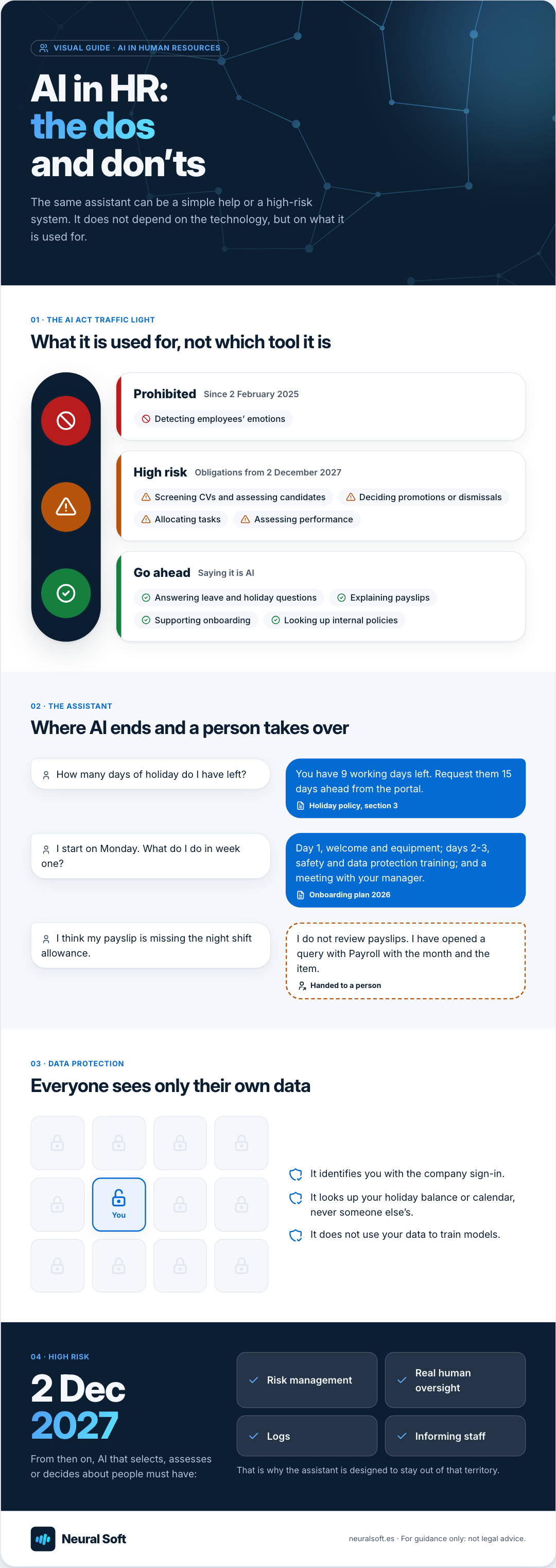
The AI Act classes as high-risk any AI system used to recruit staff, assess applications or decide on promotions, dismissals or task allocation (Annex III). The obligations for that level apply from 2 December 2027 and require risk management, human oversight, logging and informing staff. This assistant is designed to stay out of that territory.

What it does

  • Answers using the policies, the collective agreement and HR documents.
  • Looks up the employee's own data (holiday balance, calendar) after identifying them.
  • Introduces itself as AI from the first message.
  • Passes to a person anything involving a decision or a complaint.

What it does not do

  • It does not filter or score CVs or applications.
  • It does not assess performance or suggest promotions, sanctions or dismissals.
  • It does not analyse staff emotions, which the AI Act prohibits in the workplace.
  • It does not access other employees' data.

Visual guide · AI in Human Resources

AI in HR:
the dos
and don’ts

The same assistant can be a simple help or a high-risk system. It does not depend on the technology, but on what it is used for.

01 · The AI Act traffic light

What it is used for, not which tool it is

  1. Prohibited Since 2 February 2025

    • Detecting employees’ emotions
  2. High risk Obligations from 2 December 2027

    • Screening CVs and assessing candidates
    • Deciding promotions or dismissals
    • Allocating tasks
    • Assessing performance
  3. Go ahead Saying it is AI

    • Answering leave and holiday questions
    • Explaining payslips
    • Supporting onboarding
    • Looking up internal policies

02 · The assistant

Where AI ends and a person takes over

How many days of holiday do I have left?

You have 9 working days left. Request them 15 days ahead from the portal.

Holiday policy, section 3

I start on Monday. What do I do in week one?

Day 1, welcome and equipment; days 2-3, safety and data protection training; and a meeting with your manager.

Onboarding plan 2026

I think my payslip is missing the night shift allowance.

I do not review payslips. I have opened a query with Payroll with the month and the item.

Handed to a person

03 · Data protection

Everyone sees only their own data

  • It identifies you with the company sign-in.
  • It looks up your holiday balance or calendar, never someone else’s.
  • It does not use your data to train models.

04 · High risk

2 Dec
2027

From then on, AI that selects, assesses or decides about people must have:

  • Risk management
  • Real human oversight
  • Logs
  • Informing staff
  • That is why the assistant is designed to stay out of that territory.
Neural Soft

neuralsoft.es · For guidance only: not legal advice.

Frequently asked questions

Common questions before going live

What if we want to use AI to screen CVs?
It can be done, but it is a high-risk system under the AI Act and is best treated as a separate project, with a risk assessment, genuine human oversight of every decision, logging, information for workers' representatives and candidates, and a review of bias. We only propose it after a compliance analysis.
What about data protection?
Payroll and absence data are personal data. The assistant identifies the employee through the company sign-in, only looks up their own data and does not use it to train models. Before going live we review the record of processing activities and, where needed, the impact assessment.
Does it work with Microsoft 365?
Yes. It can be published in Teams with Copilot Studio, use policies stored in SharePoint as its sources, and connect to the employee portal or payroll software where they have an API.
Open-plan office with white desks and office chairs.

People

Fewer repeated questions, more time for people

The HR team stops answering the same thing over and over and spends that time on what cannot be automated: supporting, negotiating and resolving difficult cases.

  • Answers at any time, including for night shifts and weekends.
  • The same answer for everyone, based on the current policy.
  • A list of unanswered questions to improve the documentation.

Method

We start with the questions and the documents

  1. Collect the questions

    With HR we review the most frequent queries and the documents that answer them, and spot those that are missing or out of date.

    Map of questions and documents

  2. Pilot with one group

    We put the assistant in Teams or on the intranet for one department, with clear limits and handover to HR.

    Pilot assistant and usage policy

  3. Measure and extend

    We measure questions answered, handovers and satisfaction, then extend it to the whole workforce.

    Usage report and roll-out plan

Related service

  • Chatbots and internal assistants

    We build chatbots and internal assistants connected to your company's information to answer questions, reduce repetitive queries and help the team find what it needs faster.

Related training

How many times a month does HR answer the same question?

Tell us how many people you are, where your policies are kept and which tools you use (Teams, intranet, payroll software). We will tell you how to get started.