How to ask ChatGPT, Copilot, Gemini or Claude for things at work: the ingredients of a good prompt, before-and-after examples and useful techniques.
Customer service
AI virtual assistant
Hi, I'm the shop's virtual assistant. How can I help?
Do you ship to Portugal? I need 200 units.
Yes, we ship to Portugal in 3-5 working days. For an order of 200 units, I will put you through to our sales team.
Conversation handed over to the team with a summary
Neural Soft 5 min read
Key points
A good prompt has ingredients: for whom, context, task, format, examples and limits.
The context you have is what improves the result most; there are no magic words.
It is rarely perfect first time; checking and refining is part of the job.
Prompts that work are saved and shared with the team.
The difference between “AI is no good for this” and “it saved me an hour” often comes down to how it was asked. AI assistants are very capable, but they know nothing about your customer, your company or what you have in mind. If you do not tell them, they make it up.
You do not need tricks or secret phrases. A good prompt is more like a good brief to a new colleague: what you need, for whom, with what information and how you want it.
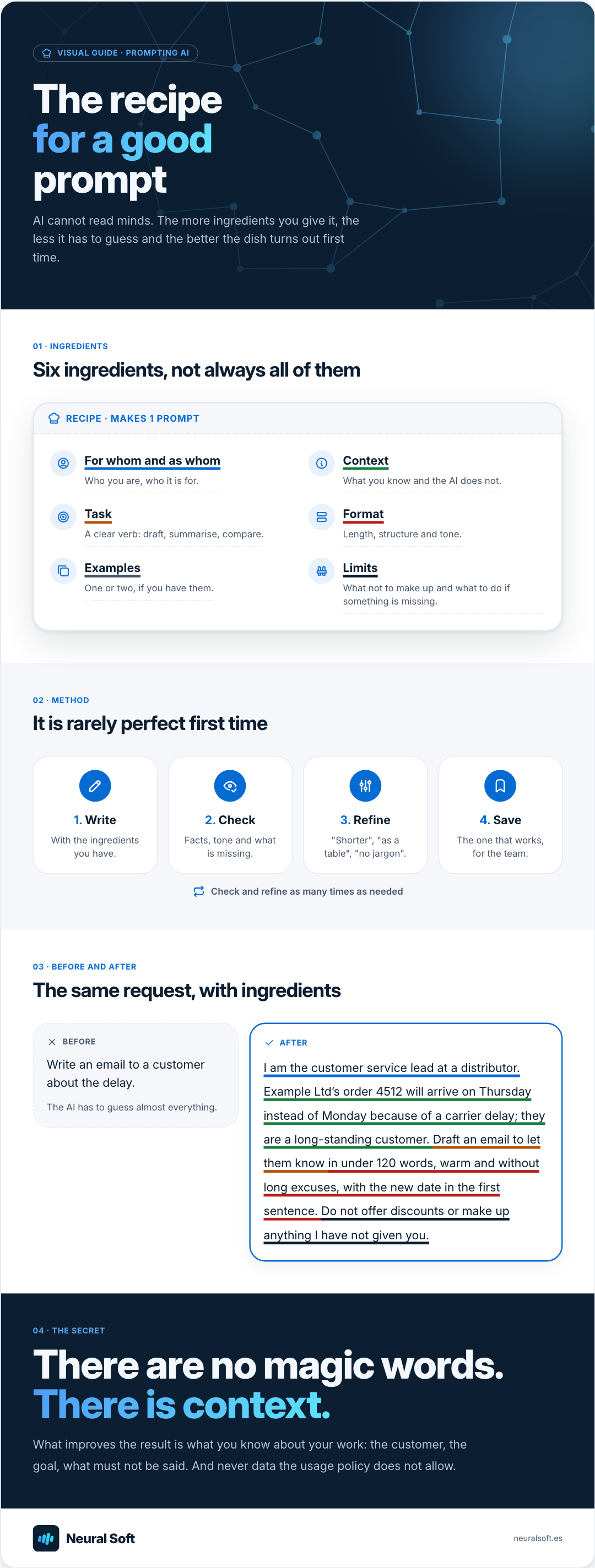
Visual guide · Prompting AI
The recipe for a good prompt
AI cannot read minds. The more ingredients you give it, the less it has to guess and the better the dish turns out first time.
01 · Ingredients
Six ingredients, not always all of them
Recipe · Makes 1 prompt
For whom and as whomWho you are, who it is for.
ContextWhat you know and the AI does not.
TaskA clear verb: draft, summarise, compare.
FormatLength, structure and tone.
ExamplesOne or two, if you have them.
LimitsWhat not to make up and what to do if something is missing.
02 · Method
It is rarely perfect first time
1. Write
With the ingredients you have.
2. Check
Facts, tone and what is missing.
3. Refine
"Shorter", "as a table", "no jargon".
4. Save
The one that works, for the team.
Check and refine as many times as needed
03 · Before and after
The same request, with ingredients
Before
Write an email to a customer about the delay.
The AI has to guess almost everything.
After
I am the customer service lead at a distributor. Example Ltd’s order 4512 will arrive on Thursday instead of Monday because of a carrier delay; they are a long-standing customer. Draft an email to let them know in under 120 words, warm and without long excuses, with the new date in the first sentence. Do not offer discounts or make up anything I have not given you.
04 · The secret
There are no magic words. There is context.
What improves the result is what you know about your work: the customer, the goal, what must not be said. And never data the usage policy does not allow.
You do not always need them all. For a quick summary, the task and the format are enough; for an email to an important customer, include almost all of them.
For whom and as whom: “I am a maintenance technician writing for the purchasing manager”.
Context: what you know and the AI does not. The customer, the background, the goal.
Task: a clear verb. Draft, summarise, compare, classify, extract, suggest three options.
Format: length, structure (table, bullet points, email) and tone.
Examples: if you have an email or report you like, give it as a model.
Limits: what it must not make up and what to do if information is missing (“if you don’t know, say so”).
Before and after
A vague prompt
"Summarise this contract."
A generic two-page summary.
You have to reread the contract to find what mattered.
A prompt with ingredients
"I am the purchasing manager. Summarise this maintenance contract in a table with: duration, renewal, notice period to cancel, penalties and price. If something is not there, write 'not stated'."
A five-row table.
Checked against the contract in a minute.
Three everyday examples
With data from a fictitious company. Notice which ingredients each prompt includes.
Preparing a meeting
Prompt
“I have a meeting with a customer who has complained twice about delays. From these emails, give me the three points I should cover and a proposal for each. Bullet points, brief.”
Ingredients
Context
Customer with two complaints
Task
Three points and proposals
Format
Bullet points, brief
Analysing a spreadsheet
Prompt
“This sheet has sales by product for 2025 and 2026. Tell me which five products fell most in percentage terms, in a table, and explain in two sentences whether you see a pattern. Do not speculate about causes.”
Ingredients
Task
Five biggest falls
Format
Table and two sentences
Limits
No speculation on causes
A job advert
Prompt
“Draft an advert for an administration role in a 30-person company, in the tone of the attached example. Use inclusive language and do not add requirements I have not given you.”
Ingredients
Context
30-person company
Example
Attached advert as a model
Limits
No invented requirements
Techniques that work
Let it ask first
"Before you start, ask me any questions you need." Very useful when you are unsure what context to give.
Split into steps
Outline first, then each section. It is easier to correct early than to redo everything.
Ask for options
"Give me three versions: one formal, one friendly and one very short." Choosing is quicker than describing.
Ask it to cite
With documents, have it state which section each fact comes from. That way it can be checked in seconds.
Checking is part of the job
AI can be wrong with total confidence: a fact, a date, a figure in a table. Whoever uses it is responsible for the result. The usual approach is a short loop:
01
Ask
With the ingredients you have.
Task + format
02
Human review
Check
Facts, tone and what is missing.
Do the figures add up?
03
Refine
With specific instructions, in the same conversation.
"Shorter and no jargon"
04
Save
If it works, as a template for the team.
Prompt library
The working loop with an AI assistant.
A prompt library for the team
Prompts that work are an asset: they save everyone time and make results consistent, whoever does the task.
1
Collect the tasks that repeat
Standard emails, meeting summaries, monthly reports, answers to frequent questions.
2
Write the prompt with its ingredients
And test it on real cases until the result is good without major edits.
Tested prompt
3
Save it where it is used
In a shared document, in the assistant’s projects or as a simple agent, depending on the tool.
4
Review it now and then
When the tool or the process changes, or when someone finds a better version.
Next step
This is best learned by practising on your own tasks. The practical AI at work course uses examples from each role and works with any assistant; for technical teams building AI into applications, the prompt engineering course goes a step further. If you want to organise training for the whole company, we can look at it in an AI consulting engagement.
Frequently asked questions
Does the same apply to ChatGPT, Copilot, Gemini and Claude?
Yes. The ingredients of a good prompt are the same in every assistant. Details change (how documents are attached or instructions saved), but the method is the same.
Do prompts need to be very long?
No. For simple tasks one sentence with the task and the format is enough. Long prompts pay off for tasks that repeat or where the result goes to a customer, and then it is worth saving them as a template.
Can I paste any document to give it context?
Only in tools approved by the company and in line with the usage policy: personal or confidential data only where permitted and with the minimum needed.
We help small and medium-sized businesses find where AI can add value, which cases are worth testing and how to start without investing in solutions they do not need.
How to choose between ChatGPT, Microsoft Copilot, Gemini and Claude for your company: criteria, data requirements and a two-week trial with real tasks.
4 min read
Want to apply this in your company?
Tell us about your case and we will tell you, with no commitment, whether AI makes sense and where to start.
We use Google Analytics to see which pages are visited. Its cookies are only set if you accept; if you decline, Google only receives cookieless signals. You can change this at any time from the footer. Cookie policy