Extracting data from invoices and PDFs with AI: what works and how to start
How to extract data from invoices, delivery notes and PDFs with AI: how it differs from OCR, validations, human review, ERP integration and running a pilot.
Document extraction
INVOICE
Extracted data
Supplier
Martí Supplies Ltd
VAT no.
B12345678
Date
14/10/2026
Net amount
€1,250.00
VAT (21%)
€262.50
Total
€1,512.50
Amounts validated Sent to ERP
Neural Soft Updated 6 min read
Key points
Today's AI understands the document like a person; you no longer need a template per supplier.
Reliability comes from the checks afterwards (totals, tax IDs, cross-checks and duplicates) and human review of doubtful cases.
The value lies in the data reaching the ERP on its own, with traceability.
A pilot with 100-200 real documents tells you how much can be automated in your case.
Supplier invoices, delivery notes, orders, contracts, scanned forms, certificates… In many SMEs someone spends hours every week copying data from documents into another system. It is tedious work, with inevitable errors, and one of the cases where AI delivers the fastest, most measurable results.
In this guide we explain what has changed with generative AI, what you can expect, how to avoid errors and how to get started.
Classic OCR versus AI: what has changed
Traditional OCR turns an image into text. To pull out specific data (“total”, “due date”, “supplier tax ID”), you had to define templates for each document format: where each field is. It works well with a few fixed formats, but it breaks when a supplier changes its invoice layout or a new one arrives.
Today’s AI models (language models with vision) understand the document the way a person would: they know that “Total amount”, “Total due” and “Importe total” mean the same thing, even when they are in a different place. That is why:
they do not need a template per supplier;
they also extract table data (invoice lines, items, quantities);
they understand documents in several languages;
they can classify the document (invoice, credit note, delivery note, order) before extracting the data.
The usual approach today is to combine both: OCR or text extraction when the PDF already contains text, and an AI model that interprets the content and returns the fields in a structured format (for example, JSON) ready for the ERP.
01
The document arrives
Through a mailbox, a shared folder or the scanner.
invoice_0457.pdf
02
It is classified
Invoice, credit note, delivery note or order.
Type: invoice
03
AI extracts
Header and lines, in a structured format.
{ total: 254.10 }
04
Human review
It is validated
If something does not add up, a person reviews it with the doubtful field marked.
Net + VAT = total ✓
05
Into the ERP
With a link to the original document.
Proposed entry
Extraction flow with validations and human review.
Validations are the key
An AI model can misread a number or mix up two dates. The difference between a reliable system and one that causes problems lies in what happens after extraction:
Arithmetic
Net amount + VAT = total; the lines add up to the net amount.
Format
Tax IDs with their check digit, valid IBAN, consistent dates (the due date cannot be before the issue date).
Cross-checks with your data
The supplier exists in the master data, the related order or delivery note exists and the amounts match.
Duplicates
The same invoice received twice.
What to expect
With reasonably legible documents and good validations, most documents go through without intervention and the rest need a quick review. The exact percentage depends a lot on:
the quality of the documents (digital PDF versus a phone photo);
the variety of formats and suppliers;
the fields you want to extract (the header is easier than the line items);
how strict the validations are.
That is why we recommend measuring it in a pilot with your real documents before committing to a bigger investment.
Beyond invoices
The same technique works for many other documents:
Delivery notes and orders: automatic matching with invoices.
Customer or onboarding forms, including scanned or legible handwritten ones.
Supplier certificates and documentation (insurance, approvals), with expiry alerts.
Job sheets and technical reports.
CVs, with care: if the extraction is used to screen candidates, it may be a high-risk use under the AI Act.
Integration: getting the data where it belongs
Extraction only really saves time if the result arrives on its own where it needs to go:
Input: a dedicated mailbox (invoices@…), a shared folder or the office scanner.
Output: the ERP or accounting software, through its API, a file import or an automation tool.
Traceability: each record links to the original document, with a log of who reviewed what.
Bear in mind that e-invoicing between businesses will increasingly arrive in a structured format and will not need extraction. Even so, PDFs, documents from foreign suppliers, delivery notes and other paperwork will coexist for years and will still need it.
Privacy and security
Invoices and contracts contain personal and financial data. Before choosing a solution:
check where the documents are processed and that the vendor offers a data processing agreement;
use services that do not use your documents to train their models;
decide how long documents are kept in the extraction system.
How to run a pilot in a few weeks
1
Choose one flow
For example, a month of supplier invoices.
2
Gather a representative sample
100 to 200 documents, with your usual suppliers and a few difficult cases.
3
Define the fields and validations
What is extracted and what is checked before it reaches the ERP.
4
Measure the baseline
How much time is spent today and how many errors are caught later.
Baseline
5
Run the pilot
Alongside the current process, comparing results.
6
Decide with data
Percentage of documents with no intervention, time saved and errors.
Pilot report
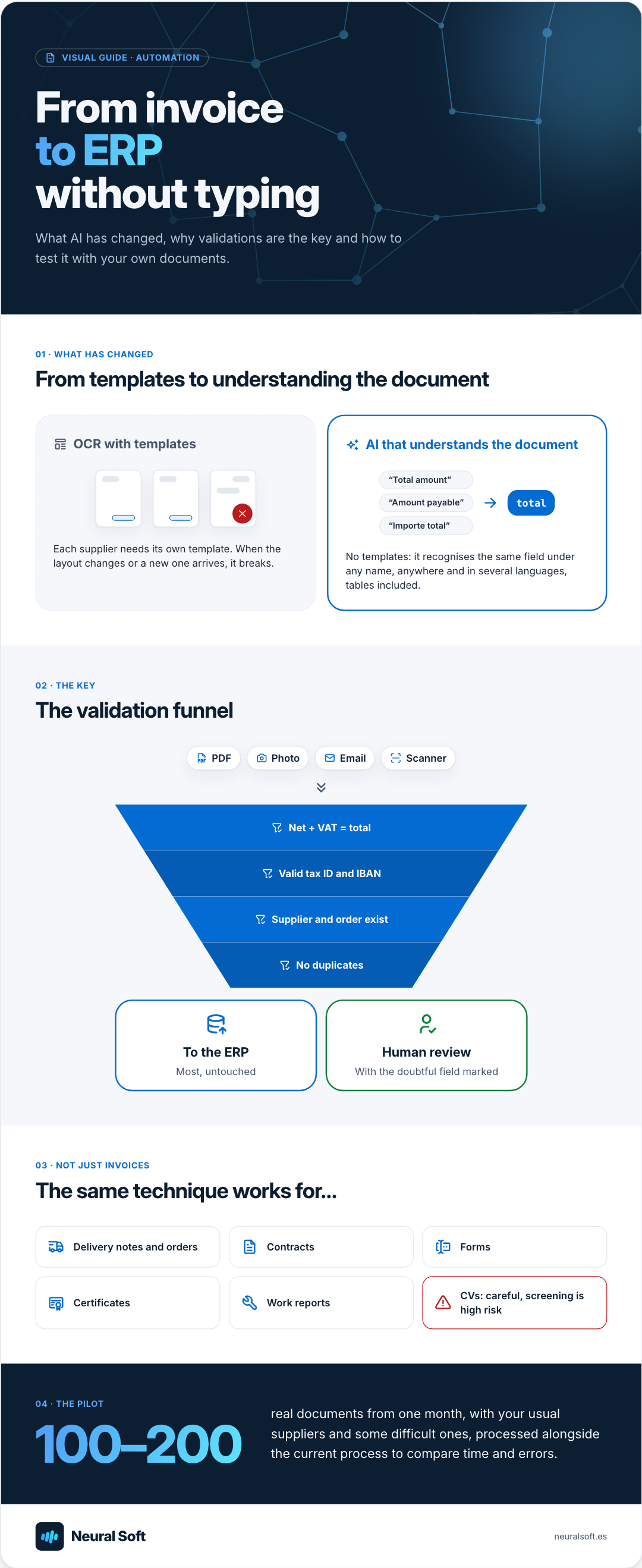
The whole process, in one picture
Visual guide · Automation
From invoice to ERP without typing
What AI has changed, why validations are the key and how to test it with your own documents.
01 · What has changed
From templates to understanding the document
OCR with templates
Each supplier needs its own template. When the layout changes or a new one arrives, it breaks.
We automate repetitive tasks with AI so your team spends less time copying data, reviewing documents, classifying requests or drafting replies by hand.
We use Google Analytics to see which pages are visited. Its cookies are only set if you accept; if you decline, Google only receives cookieless signals. You can change this at any time from the footer. Cookie policy