AI internal assistant for company documentation (RAG)
How an AI internal assistant that answers from your company's documentation (RAG) works, when it is worth it, the risks and how to run a pilot.
Internal assistant
How long do customers have to return an item?
Customers have 30 calendar days from delivery. The item must be unused and in its original packaging.
Returns procedure · v3 · p. 2
What if the item arrived damaged?
Ask about your documentation…
Neural Soft Updated 7 min read
Key points
A RAG assistant answers in plain language from your documents and cites where each piece of information comes from.
The model is not retrained; documents are consulted for each question, respecting each person's permissions.
It works well with lots of documentation and repeated questions; it does not replace querying a live database.
Start with a narrow pilot and 30 to 50 real questions to measure quality.
“Where is the returns procedure?”, “What does the contract with this supplier say about deadlines?”, “How do you set up product X for a new customer?”. In any company, a big part of the day goes on looking for information that already exists, or on asking the same person as always.
An AI internal assistant answers these questions in natural language, from the company’s documentation and citing where each answer comes from. The technique that makes it possible is called RAG (retrieval-augmented generation).
What RAG is, explained without jargon
A language model like the ones behind ChatGPT or Claude knows a lot about everything, but it does not know your documents. And if you ask it something it does not know, it may make it up. RAG solves this in two steps: first it searches for the passages in your documentation most relevant to the question, then it asks the model to answer only from those passages, saying which document each piece of information comes from.
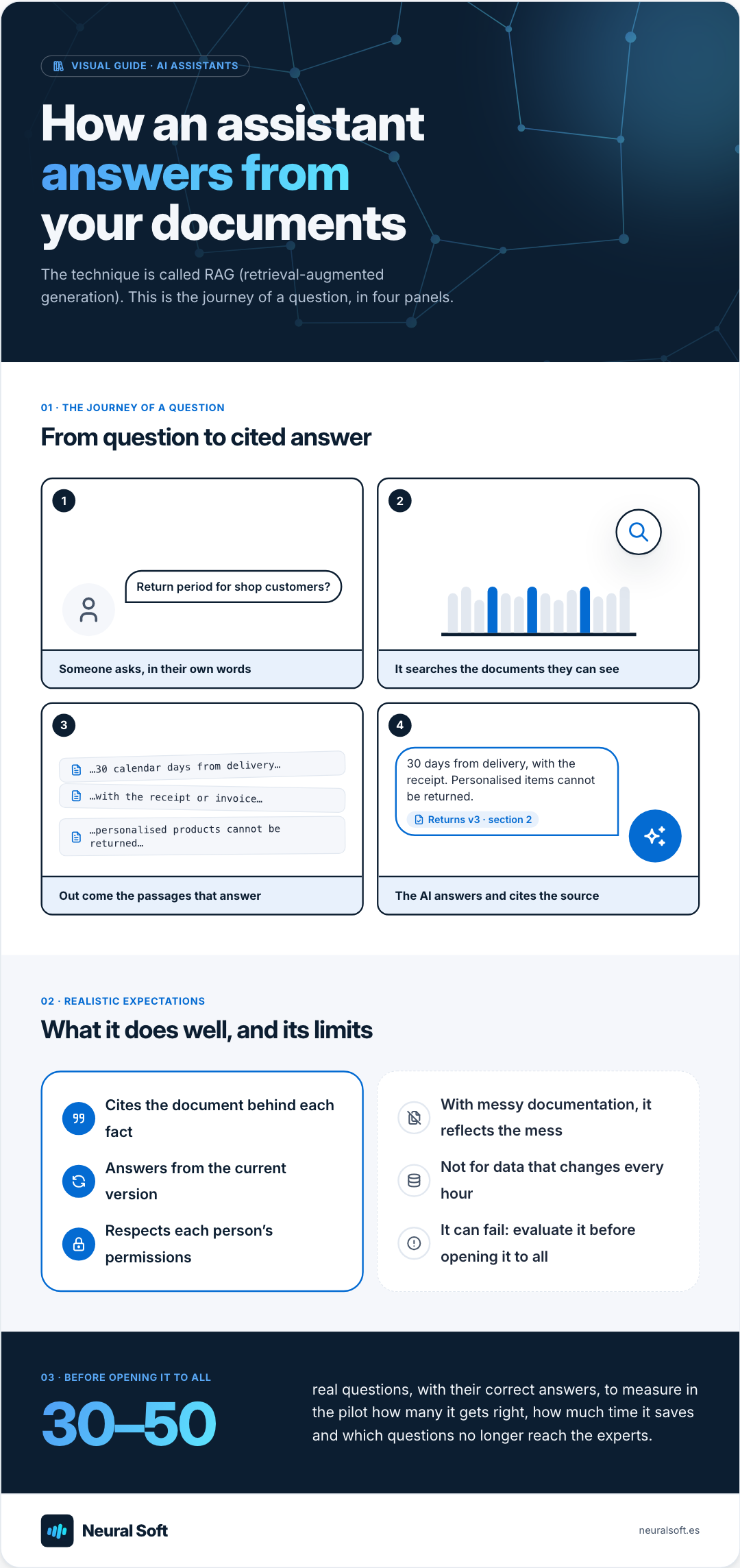
Visual guide · AI assistants
How an assistant answers from your documents
The technique is called RAG (retrieval-augmented generation). This is the journey of a question, in four panels.
01 · The journey of a question
From question to cited answer
1
Return period for shop customers?
Someone asks, in their own words
2
It searches the documents they can see
3
…30 calendar days from delivery… …with the receipt or invoice… …personalised products cannot be returned…
Out come the passages that answer
4
30 days from delivery, with the receipt. Personalised items cannot be returned. Returns v3 · section 2
The AI answers and cites the source
02 · Realistic expectations
What it does well, and its limits
Cites the document behind each fact
Answers from the current version
Respects each person’s permissions
With messy documentation, it reflects the mess
Not for data that changes every hour
It can fail: evaluate it before opening it to all
03 · Before opening it to all
30–50
real questions, with their correct answers, to measure in the pilot how many it gets right, how much time it saves and which questions no longer reach the experts.
Three typical questions to a documentation assistant, with data from a fictitious company. Notice that the answer always says where it comes from, and what it does when it should not answer.
An answer with its source
Question from a sales rep
“How many days does a shop customer have to return a product?”
Answer
30 calendar days from delivery, with the receipt or invoice. Personalised products cannot be returned.
Returns procedure v3 · section 2
When it cannot find it
Question from a technician
“What tightening torque does the X-200 model use on the rear fixing?”
Answer
I cannot find that in the available documentation. You can check with the technical department.
Question logged to complete the manual
When it has no permission
Question from an employee
“What is the salary for the warehouse manager role?”
Answer
I do not have access to salary information for your profile. If you need it, please ask HR.
No access to HR documents
How the documentation is prepared
Before it can be searched, the documentation is indexed. It is an automatic process that runs again whenever a document changes, so the assistant always answers from the current version.
01
Extract the text
PDF, Word, intranet pages, wikis or resolved tickets.
PDF · DOCX · intranet
02
Split into chunks
It is divided into sections and subsections that make sense on their own.
Section 2.1 · 1 chunk
03
Represent the meaning
Each chunk becomes numbers (an embedding) that make it possible to find similar texts even when they use different words.
“return” ≈ “refund”
04
Store with metadata
Document, date, department and who has permission to see it.
Sales · current · all
Indexing: from the company's documents to an index that can be searched.
How it finds the passages: by meaning
The key step is the third. By turning each chunk into numbers based on its meaning, the search finds what answers the question even if it shares not a single word with it.
Returns Billing Human resources Product Return period Refunds Personalised products Size exchanges Credit notes Payment methods Due dates Holidays Payslips Remote work Warranty X-200 assembly Maintenance
Question
“How long does a customer have to send an order back?”
Nearest chunks
1Return periodReturns procedure · section 2
2RefundsRefund policy · section 1
3Personalised productsTerms of sale · section 7
The question says “send an order back” and the documents say “return period” or “refund”: they are found because they mean the same, not because they share words.
An illustrative example: a two-dimensional map of a space that really has hundreds of dimensions.
When it is worth it
The hard part is not the model but finding the right passage. That is why tidy documentation matters as much as the technology.
A documentation assistant usually works well in these situations:
A lot of documentation
Procedures, manuals, regulations, contracts or product sheets, and the team wastes time searching.
Repeated questions
The same questions keep coming to the same people.
New people
People join often and onboarding depends on whoever has time.
Fast answers
Support or the sales team need accurate answers about products or terms.
Commercial tool or custom solution
There are two routes today, and they are not mutually exclusive:
Built-in features
Microsoft 365 Copilot, Google Gemini for Workspace or the business editions of ChatGPT or Claude.
They search your documents with no development.
Quick to switch on and enough for many general uses.
Custom assistant
Varied sources: ERP, CRM, tickets or wiki.
Answers in a specific format and fine-grained permissions.
Integrated into your applications, with the model of your choice and data processed in the EU.
A good assessment helps you decide: often the commercial option covers most of it and only the specific part is worth building.
The risks and how they are controlled
Made-up answers
The risk is never zero, but it drops a lot if the assistant:
answers only from the retrieved passages and says "I don't know" when it finds nothing;
cites its sources with a link to the document;
is evaluated with real questions before it is opened to the whole team.
Permissions
The assistant must not show anyone a document they could not open. Permissions are enforced at search time, not by trusting the model "not to say it".
Data and vendors
You need to know where the data is processed, under what contract and whether the vendor uses it for training (in business editions, usually not). With personal data, the GDPR applies.
Outdated documentation
If three versions of the same procedure coexist, it may cite the old one. Part of the project is deciding which sources are official and who maintains them, and that already improves how things are organised.
How to run a pilot
1
Choose a narrow scope
One department or one type of documentation, for example quality procedures or product sheets.
2
Collect 30 to 50 real questions
The ones asked most often, with their correct answers. They will be used to measure quality.
Question bank
3
Index the sources
Set up the assistant for that scope with citations and permissions.
4
Test it with a small group
For a few weeks, collecting the questions it gets wrong.
5
Measure
Percentage of correct answers, search time saved and questions that no longer reach the experts.
Pilot report
6
Decide
Whether to extend it to other areas, and with which sources.
No. With RAG the model is not retrained: the documents are consulted for each question. It is cheaper, updates instantly and makes it easier to control what can be seen.
Can it answer in several languages?
Yes. Today's models answer in the language of the question even if the documents are in another.
Can it be connected to Teams, Slack or the intranet?
Yes. It is usually integrated where the team already works, so nobody has to open another application.
We build chatbots and internal assistants connected to your company's information to answer questions, reduce repetitive queries and help the team find what it needs faster.
How to extract data from invoices, delivery notes and PDFs with AI: how it differs from OCR, validations, human review, ERP integration and running a pilot.
We use Google Analytics to see which pages are visited. Its cookies are only set if you accept; if you decline, Google only receives cookieless signals. You can change this at any time from the footer. Cookie policy